Driving a notebook with a coding agent
strata agent <notebook-dir> is a one-command on-ramp: it stands up everything
a coding agent (Claude Code) needs to drive a live Strata notebook, and
attaches a terminal viewer so you watch it happen in real time.
This is the coding agent quickstart. The same notebook can also be driven by hand in the web UI or watched from a terminal.
Not the same as using a notebook as a scratchpad
Here the notebook is the deliverable: you asked for it, you watch it get
built, you keep it. An agent can also use a notebook as disposable
infrastructure while working on something else entirely, running
throwaway Python that happens to be cached instead of thrown away. That is
a separate setup with a different starting point: this page
starts with you running a command, that one starts with the agent noticing
it has a better option than python -c.
It exists because the pieces were already there (the MCP server, the
strata CLI ops, the terminal viewer), but wiring them
together by hand is a fiddly, ordered dance: enable the MCP endpoint before
the server boots, open a session (the agent can't do that itself), point the
agent at the right session, and only then start driving. strata agent does all
of it in one step.
Prerequisites
The [mcp] extra (the agent endpoint) and Claude Code
(or another MCP-capable coding agent) on your PATH. Add [tui] for the
terminal viewer; skip it if you plan to watch in a browser and pass --no-tui:
uv sync installs into the checkout's .venv, it does not put strata on
your PATH. Run every strata … command below as uv run strata … from
the checkout. A bare strata there is whatever else you have installed,
which on a machine that also has the released package is a different and
usually older build.
Use it
You need two terminals: one holding the notebook open, one for the agent.
1. Open the notebook for an agent
This scaffolds the notebook if it does not exist, starts a server with the agent endpoint enabled, opens a session, and attaches the terminal viewer. It prints the exact line to run next, then hands the terminal to the viewer. Leave it running.
2. Start the agent beside it
In a second terminal:
Claude Code finds the .mcp.json that step 1 wrote, connects to the
strata-notebook MCP server, and reads the working agreement from CLAUDE.md.
Any other agent: finding the session and driving it
.mcp.json and CLAUDE.md are a Claude Code convenience, not the
interface. Everything below them is an ordinary HTTP server and a session
id, so any agent can drive the same session two ways.
strata agent prints the session id when it starts. To find it again, or
to attach to a server someone else started, ask the server:
curl -s http://127.0.0.1:8765/v1/notebooks/sessions | jq -r '.sessions[] | "\(.session_id) \(.path)"'
If the notebook is not open yet, open it. This is the one step an agent cannot do through the MCP tools, which only see sessions that already exist:
SID=$(curl -s -X POST http://127.0.0.1:8765/v1/notebooks/open \
  -H 'content-type: application/json' \
  -d '{"path": "./my-notebook"}' | jq -r .session_id)
Then either point the agent's MCP client at http://127.0.0.1:8765/mcp
(streamable HTTP, the same endpoint .mcp.json names), or drive the
session from the CLI with the selectors the
CLI guide covers:
strata status    --server http://127.0.0.1:8765 --session "$SID"
strata cell add  --server http://127.0.0.1:8765 --session "$SID" -c 'print(1 + 1)' --run
Both routes reach the session the human is watching. A path-based
strata … ./my-notebook does not: it opens its own offline session on the
directory, so nothing it runs appears in the viewer.
3. Ask for something
Simulate 100,000 rolls of three dice and tell me how often the total beats 12.
Build it in the notebook.
The agent adds cells and runs them. Each one appears in the viewer in the first terminal as it happens: status flips to running, then the output lands. That is the confirmation that it is driving the notebook rather than writing scripts: if nothing appears in the viewer, it is not using the notebook. A cell that appears and goes red is fine. That is the notebook working and the code failing, which is a normal first draft.
Asking for something that needs a library
A freshly scaffolded notebook's environment has only what the cell runtime
needs (pyarrow, orjson, cloudpickle). Ask for pandas or scikit-learn
and the agent adds it first with the add_dependency tool, so expect an
environment sync before the first cell runs. The example above is deliberately
dependency-free so your first run is a clean one.
4. Take it from there
The notebook is a normal notebook. Open it in the web UI to edit a cell yourself, re-run it, or keep working after the agent stops. Several views can watch at once, and you can edit in the browser while the agent is still going.
When you quit the viewer, the server strata agent started is shut down with
it. If you pointed it at a server you started yourself, that one is left
running. A server the launcher started writes its logs to
.strata/server.log in the notebook directory, not to your terminal.
What strata agent does under the hood
The command exists because doing this by hand is a fiddly ordered dance:
- creates-or-opens the notebook directory (scaffolds a new one if needed),
- starts a notebook server with the MCP endpoint enabled (or reuses one already running on the target URL),
- opens a session, the step the agent cannot do itself, since the MCP tools only see notebooks that are already open,
- writes a
.mcp.jsonand a managed block inCLAUDE.mdinto the notebook directory, and - attaches the read-only TUI to that session.
Watching an agent work
strata agent attaches the TUI because it is the option that needs no extra
step. It is not the only one, and it is not the richest.
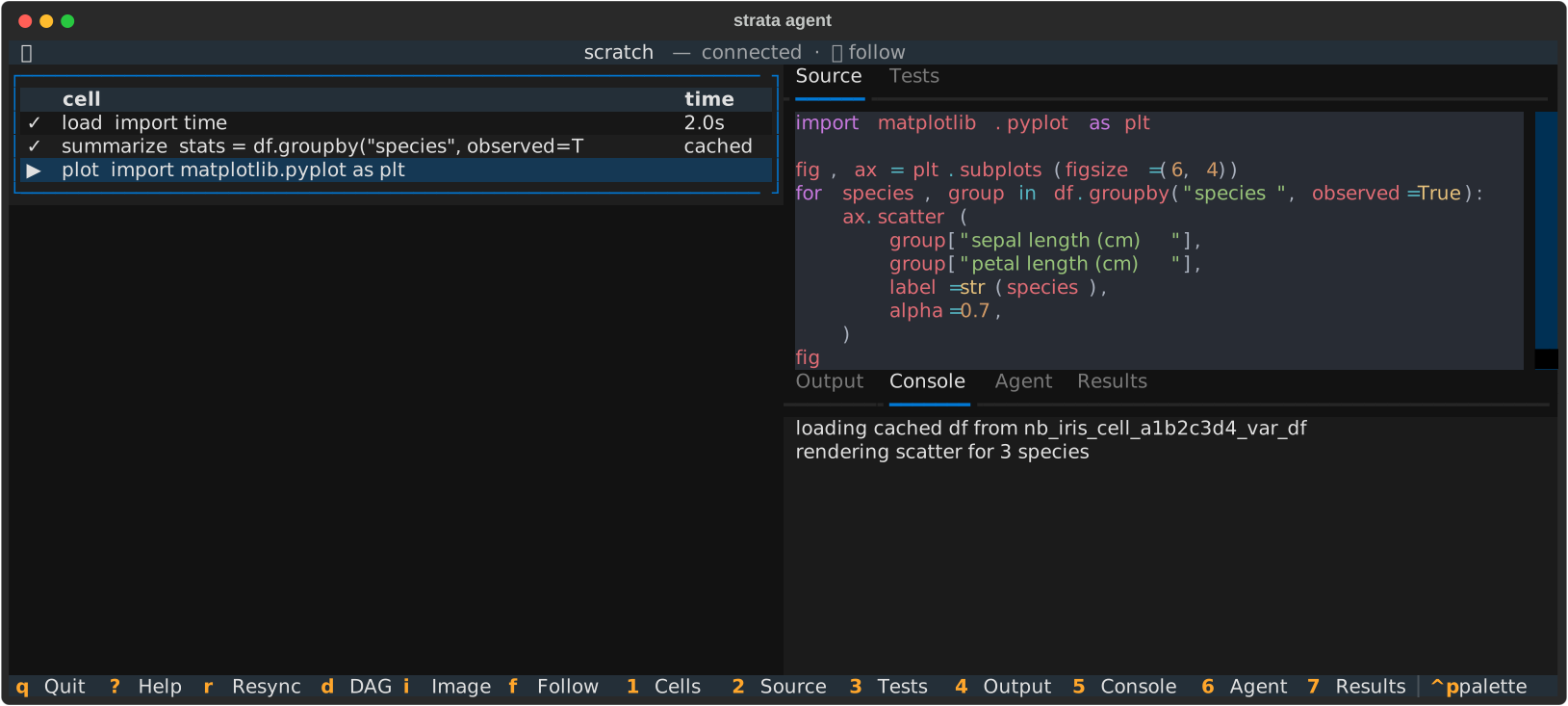
Everything that watches a notebook is a WebSocket client on the same session,
and the server broadcasts each cell_status / cell_output / cell_console
frame to all of them. Opening the notebook a second time reuses the existing
session rather than creating a new one, so any of these lands on the session the
agent is driving:
| How | What you get | When it fits |
|---|---|---|
| Web UI, by opening the server URL in a browser | The full editor: outputs, plots, the DAG, the inspector. Not read-only, so you can edit and run cells alongside the agent | You want to see rendered output, or take over |
TUI, via strata watch ./my-notebook |
Read-only live spectator in the terminal | No browser, over SSH, or beside the agent in a split terminal |
| Any WebSocket client | The raw frames | You are building your own view; see the client protocol |
| Nothing, then read the directory | cells/*.py is the source; .strata/runtime.json holds display outputs, provenance and timings; .strata/console/ holds per-cell stdout/stderr |
You would rather review afterwards than watch |
One thing to know about the web UI row: an open tab follows the agent's source edits as well as its status and outputs, but a cell you are part-way through typing in is left alone until you stop. Your unflushed keystrokes are never overwritten. If the agent changed the cell in the last few seconds, your edit is held back and the cell shows who changed it, with a Take over button; the agent is told the same about yours. Neither is a merge. See presence and soft locks.
The last row is worth knowing: a notebook is a directory of ordinary files, so
strata cell show, strata dag, git diff and your editor all work on an
agent's output with no live connection at all.
One caveat on that row. running belongs to the session rather than to disk,
so you never see it offline. What you do see is recomputed from the artifact
store:
- A cell whose output another cell consumes reports
readyorstale, with the reasons why. - A cell whose last run failed reports
error, with its traceback, until it is edited or run again. - A leaf cell, one nothing else reads, reports
readyafter it has run like any other cell, andstaleonce a cell it reads runs with a new value. It stores no variable artifact; its console, even an empty one, is the record of the run. A# @nocacheleaf, or one with a read-write mount, stores no such record, so it readsidleeven after it ran.
For "what is it doing right now", attach one of the live views above.
If you would rather keep a browser tab than a terminal viewer, start with
strata agent --no-tui and open the notebook in the web UI instead.
What gets written into the notebook
.mcp.json: registers the running server's/mcpendpoint as an MCP server namedstrata-notebook, so Claude Code auto-connects when launched in the directory. Overwritten on each launch (it points at the current port).CLAUDE.md: a working agreement telling the agent to drive the notebook through the MCP tools rather than writing throwaway.pyscripts, so its work is captured as versioned, content-addressed, cached cells that you can see. Only the region between the<!-- strata:agent:start -->/<!-- strata:agent:end -->markers is managed; your own notes in the same file are preserved and rewritten around.
Neither is part of the notebook's committed set. The .gitignore that
strata new writes ignores both, since every launch rewrites them with this
machine's port and session id, and exports leave them out. Anyone who clones
the notebook runs strata agent to get their own.
Options
| Flag | Effect |
|---|---|
--server URL |
Server base URL; reused if already running there, else started. Default http://localhost:8765 (or $STRATA_TUI_SERVER). |
--python X.Y |
Python major.minor for a newly created notebook's venv. |
--no-env |
When creating a notebook, skip building its venv now. |
--no-tui |
Set up and open the session but don't attach the TUI (useful when you keep a browser tab open instead, or drive the launcher from a script). The session id is printed as soon as the session opens, and SIGTERM or Ctrl-C stops the server the launcher started. |
--worker-ssh user@host |
Provision a remote worker over SSH and route cells to it (see below). |
Running cells on a remote machine
Hand the agent an SSH target and it can run the heavy cells on that box: a GPU
machine, a bigger instance, or one closer to the data. The agent calls the
connect_ssh_worker tool (its working agreement tells it to when you give it a
target); or wire it up as the session opens with strata agent … --worker-ssh
user@gpu-box. Strata installs the worker on the box if needed, tunnels to it,
and makes it the default; keep a specific cell local with # @worker local. See
Run cells on a machine you can SSH to.
Reusing a server you already run
If a server is already listening at the target URL, strata agent reuses it
instead of starting one, but it must have the MCP endpoint enabled, and it must
be allowed to open the notebook. A server confines notebooks to its configured
storage root, so a reused server only opens notebooks that live under that root.
If it can't, stop it and let strata agent start one scoped to your notebook.
Related
- The notebook as an agent's scratchpad: the other use case, where the notebook is disposable rather than the deliverable.
- MCP Server: the full tool list and the endpoint's security model.
- Terminal Viewer (TUI): the live spectator
strata agentattaches. - Authoring Programmatically: the same ops as a Python API.
- Distributed Workers: running cells on a remote box over SSH.